Form 5330 Attachments – What to Attach and How
When filing Form 5330, certain situations require additional documentation. This page explains each attachment type, when to use it, and how to prepare it correctly.
Use the attachment type that best matches your filing scenario.
- 8822-B
- Amended Return Changes (template provided)
- Binary Attachment
- Prohibited Transactions Correction Statement
- Prohibited Transactions No Correction Statement (template provided)
- Reasonable Cause Explanation
NOTE: Attachments may be added and removed from individual form filings by selecting the Attachment link below the specific form listing in the 5330 section:
8822-B: Change of Address or Responsible Party (Return to top)
Format
- PDF file (IRS Form 8822‑B)
Purpose
- Notifies the IRS of a change to a business address or responsible party.
Instructions
- Complete IRS Form 8822‑B located under the Other Forms section (below the 5330 section of the 5500 Module)

- Save the completed form as a PDF by selecting the Form 8822-B link under the Final column

- Attach the PDF to your Form 5330 filing


Amended Return Changes (Return to top)
Format
- CSV spreadsheet- template provided on Attachments page
Purpose
- Required when filing an amended Form 5330
- Explains what values changed and why
Instructions
- Download and complete the provided .CSV template
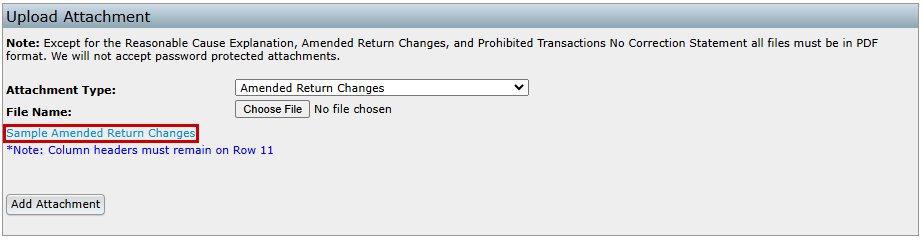
- All columns must be completed
- Do not edit or remove the header row or rows 1–11, as this will prevent the file from importing properly
Template Guidance
- PartNum – Enter I (Part I, Lines 1–16) or II (Part II, Lines 17–19)
- LineNum – Enter the Form 5330 line number being corrected
- OnPreviousReturnAmt – Amount reported on the original return
- OnAmendedReturnAmt – Corrected amount
- ExplanationTxt – Brief explanation of the change
NOTE: Changes to schedules on pages 3–6 of Form 5330 do not need to be documented.
Example
- Completed CSV showing original vs. corrected amounts

Binary Attachment (Return to top)
Format
- PDF file
- Password‑protected files are not allowed
Purpose
- Used for supporting documentation that does not fit another attachment type
Instructions
- Enter a descriptive attachment name (required field)
- Upload a PDF file only
Example
Reasonable Cause Explanation (Return to top)
Format
- Text entered directly into the attachment window
Purpose
- Explains why a filing was late, incorrect, or otherwise non‑compliant
- Supports requests for penalty relief
Instructions
- Enter the explanation directly in the provided text field
- The system converts the text into the required IRS format
- Keep explanations clear, concise, and specific
Example

Prohibited Transactions Correction Statement (Return to top)
Format
- PDF file
- Password‑protected files are not allowed
Purpose
- Used when prohibited transactions reported on Schedule C have been corrected
Instructions
- Create a PDF documenting each corrected transaction
- Upload the PDF with your Form 5330 filing
Required Information
- Transaction Number (from Schedule C, column (a))
- Description of the transaction
- Correction Date
- Correction Method (e.g., lost earnings deposited, loan re‑amortization)
- Excise Tax Paid
Example
- PDF listing corrected transactions with correction details and excise tax amounts
Plan Name: ABC Company 401(k) Plan
EIN: 12-3456789
Plan Year: 2024
Transaction 1:
- Transaction Number: 001
- Description: Late deposit of employee deferrals from January 2024 payroll.
- Correction Date: 03/15/2025
- Correction Method:
- The employer deposited the missing deferrals into affected participants' accounts.
- Lost earnings were calculated using the Voluntary Fiduciary Correction Program (VFCP) calculator and credited accordingly.
- Affected participants were notified of the correction.
- Excise Tax Paid: $2,000
Prohibited Transactions No Correction Statement (Return to top)
Format
- CSV spreadsheet- template provided on Attachments page
Purpose
- Used when prohibited transactions have not yet been corrected
- Reports planned correction dates not captured on Schedule C
Instructions
- Download and complete the provided .CSV template


Template Guidance
- TransactionNum – Transaction number from Schedule C (3 digit max- leading zeros may be removed)
- TransactionDesc – Brief description of the transaction
- PlannedCorrectionDt – Planned correction date (MM/DD/YYYY)
Example
| TransactionNum | TransactionDesc | PlannedCorrectionDt |
|---|---|---|
| 1 | Late deposit of January 2024 deferrals | 03/15/2025 |
| 2 | Incorrect loan offset distribution | 04/01/2025 |
Key Differences between Prohibited Transactions Correction Statement and Prohibited Transactions No Correction Statement(Return to top)
Feature |
Correction Statement |
No Correction Statement |
|---|---|---|
Purpose / When to Use |
Used to report corrected prohibited transactions. Required when a prohibited transaction has been corrected and needs to be reported to the IRS. |
Used to report unresolved prohibited transactions with a planned correction. Required when no correction has been made yet. |
Required Attachment Type |
PDF file (customer generated) |
CSV Spreadsheet (template provided) |
| Details Included | Includes detailed correction info:
1. Transaction Number from Schedule C 2. Description of the transaction 3. Correction Date (MM/DD/YYYY) 4. Correction Method (e.g., lost earnings, re-amortization, etc.) 5. Excise Tax Paid |
Includes unresolved transaction details:
1. Transaction Number from Schedule C 2. Description of the unresolved transaction 3. Planned Correction Date (MM/DD/YYYY) |
